This sub-menu contains two effects: Ordered Dither and Quantize / Dither.
Color Effects
Ordered Dither
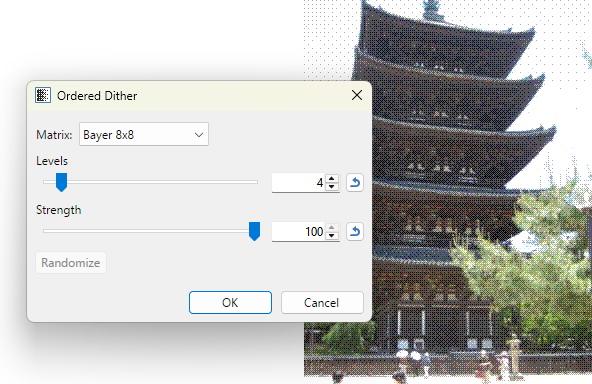
This effect applies a pattern of ordered dithering to the image, reducing the number of colors while preserving detail.
Matrix: This dropdown defines the type and size of dither to be applied.
Levels: Levels defines the coarseness of the dither pattern. Higher values produce smoother transitions.
Strength: Determines how much of the original image will be replaced with the dithered version.
Randomize: If the selected dither type supports it, this button generates a new random seed using the current parameters.
Example - Effects > Color > Ordered Dither
Quantize / Dither
This effect reduces the number of colors in an image. Quantization is sometimes called “palettization”; the process of recoloring a full-color image with a smaller number of shades, thereby reducing the total color range.
Algorithm: This dropdown changes the algorithms used. The options are Median Cut and Octree. Both reduce the palette to 256 shades or less, and both have nine levels of dithering. Octree deals better with images that have a large number of colors. It produces good results with little degradation when converting from a high number of colors to something more reasonable. The downside is that it's a more computationally expensive algorithm, which means that it will typically take longer than Median Cut algorithm to quantize the same image.
The name Octree comes from the data structure that is used to represent the colors of the image. It is made up of a number of nodes, each of which has up to 8 children.
of and size of dither to be applied.
Colors: Defines the number of colors in the final palette.
Dithering level: Controls the amount of dithering applied. Higher values produce more noise but can reduce banding.
Transparency threshold: Determines the threshold for considering pixels as transparent.

 Ordered Dither
 Quantize / Dither
